Creating and launching a customer portal could seem like a huge project that requires multiple moving pieces, including finding the right software, resources, and support. In this guide, we will help you in finding the right customer portal software for your team. Read on to learn:

What is a customer portal?

A customer portal/ client portal is a web portal where customers can track their support requests, find quick answers to common questions, view product updates and information, and engage with other customers. A client portal software should combine functionalities like ticketing, knowledge base, and community software to help businesses deploy and maintain an online portal.

Customer portal software Customer portal software

Why do you need a customer portal?

Generally, email, messaging, mobile apps, phone calls, and social media have been the preferred channels used by customers to contact businesses for help. But with a dedicated client portal at the customer’s disposal, businesses can deflect tickets and empower customers with self-service options.

A client portal gives customers access to multiple resources at their fingertips. Users who visit the customer portal can access details about policies and check the status of tickets raised, read detailed knowledge base articles on different product capabilities, navigate through frequently asked questions, interact with other customers from the product community forums, and much more.

What should a customer portal include?

We have underlined the essential components of a client portal that are integral to its success.

Ticket deflection functionality

A client portal ensures that customers don’t have to contact the customer support team to troubleshoot a problem. A robust customer portal helps deflect incoming support tickets by redirecting customers to a carefully assorted array of self-service resources and extending support via a well-connected community forum. Agents can focus their efforts on answering more complex customer queries instead of handling minor, repetitive issues.

Brand identity

A client portal should act as an extension of your brand landing page. It is important for a brand to extend its identity to its customer support portal to reassure customers that they are in the right place and have access to authentic information. A customer portal should have the brand’s logo, consistency in visuals and design, and an overall look and feel that resonates with the essence of the company’s image.

Customer information repository

A client portal lets a company capture customer information relevant to the issue at hand. This generally encompasses the customer data, the tickets raised, and the frequency with which they have interacted with your brand across channels. You can use client data such as order numbers or any additional detail to give you the complete context of the customer’s problem and avoid unnecessary back and forth.

Status of customer queries

A customer portal enables brands to build a transparent communication channel with their clients/ customers. Customers can easily log in to the client portal to view the status of their tickets. Is it being processed? Which agent is working on their ticket? Is there a time they have been promised by the brand for a reply? This will help them manage their expectations and plan their operations accordingly.

Product updates and company policies

If you’re a business supporting more than one product, you will need a dedicated client portal for each of them. Customer portal software like Freshdesk offers multi-product support so that everything stays streamlined behind the scenes while your customers only see what’s relevant to them. Your agents can seamlessly manage customer requests from these portals in a single, unified location.

Not only will your customer portals host information about your products, but also highlight company policies such as returns, exchange, upgrade, order information, etc.

How to build a customer portal?

Building a customer portal requires the right client portal software. A robust customer service software like Freshdesk includes features for building a client portal, and allows you to create and customize it to align with your brand.

Start by customizing your portal with your company’s logo and branding style. Depending on the software program you decide to use, the respective company guide will walk you through the steps of configuring and customizing your portal. However, refrain from overloading your customer portal with images and branding materials that might overwhelm your customers. Remember that your client portal should be easy to search through and navigate.

Once you’ve customized your client portal and enabled ticket submission and chat options, the final step will be to integrate the portal with your website, so it’s easy to find. You can do this by placing a link or inserting a widget onto your website that will direct customers to the portal.

Check out a collection of beautiful customer portals powered by Freshdesk.

Benefits of a client portal software

Improves customer satisfaction

Deliver consistent and seamless customer service with a unified view of customer conversations across communication channels, enabling complete historical context and more effortless experiences for customers and agents.

Delivers proactive support

Ensure there are no breaks in customer experience by deploying a smart widget that identifies frustration signals in real-time and offers assistance with useful FAQs and self-service resources.

Boosts agent productivity

Automate repetitive tasks and free up your team’s time to work on more complex customer requests with flexible workflow automation supported by your client portal software.

Enables efficient collaboration

Work with team members on various tasks like knowledge base creation and getting answers for ticket resolution from different teams, using your client portal software’s collaborative workspace.

Builds robust support workflows

Your client portal software should allow importing relevant data from your project management system, CRM, invoice tool, etc using flexible APIs and one-click integrations.

How to choose the right client portal software?

From the multiple options to choose from, here are the must-have features you should look out for when choosing your client portal software.

Knowledge base management

When customers land on a client portal, they want to access information about the product to solve their problems. Your client portal software should be able to help you host this information in easily-identifiable folders, FAQs, and guides. Some software also support universal search functionality that helps customers find all relevant articles and solutions with a click of a button.

support community building

Your client portal software should allow agents to access customer queries from across channels and empower customers to discuss solutions and possible troubleshooting steps and ideas with each other. An ideal customer portal software allows customers to not only track the progress of their queries but share their opinion about the product in real-time, helping businesses benefit from such discussions.

Ticket creation and task management

A customer portal software helps convert customer queries into tickets and allows them to flow into a unified dashboard where the relevant agents can resolve them. This makes the transition between self-service and contacting a human support agent much easier. So if a customer cannot find self-help resources on the client portal, they can directly raise a ticket for the specific query and track the status for the same.

Access to product updates and announcements

Your customer portal software should be able to integrate with third-party apps and enable collaboration across teams. This helps teams to keep the portal updated with company policies and product releases. Customers can also access the client portal for information about the latest feature announcements and other important product information.

Top 7 client portal software for your business

Now that you know the benefits of deploying a client portal software, here’s a list of the top 7 software for you to choose from.

#1 Freshdesk

Freshdesk is an all-in-one help desk that brings together the functionality of a ticketing system with the features of an easy-to-use self-service portal to get your customer portal up and running in no time.

Here are the essential features that make Freshdesk the ideal customer portal software for your business.

Best-in-class knowledge base features

Freshdesk allows you to build a comprehensive, well-structured, and well-indexed self-service portal.

  • Rich text editor - Enjoy various formatting options and better support for embedding images.

  • Versioning and translations - Maintain different solution articles for different versions of your product, and support translations in multiple languages.

  • Article feedback and analytics - Get important insights on how well your knowledge base content is doing by measuring customer satisfaction.

  • Optimizing solution articles for search engines - Ensure your help content has the right meta information to get indexed on search engines.

Advanced knowledge base Advanced knowledge base

End-to-end portal customization

Tailor the look and feel of your customer portal with Freshdesk to make it look like a natural extension of your brand.

  • Portal URL - Point your support portal URL to your own domain to make customers feel like they’re never leaving your website.

  • Branding and white-labeling - Add your logo, and tweak the style and color of all the visual elements in the portal to match your website’s design.

  • Ready-made themes - Access Freshdesk’s gallery of plug-and-play themes to build your customer portal without developer assistance.

Portal customization Portal customization

Flexible ticket forms

Freshdesk’s ticket forms help customers reach out to you through the support portal. They help you collect all the information you require, eliminating the need for agents to ask basic, repetitive questions to customers. You can customize the fields in the ticket forms to fit your business type and internal support processes. You can create dynamic ticket forms where the fields change based on user inputs.

Flexible ticket forms Flexible ticket forms

Multi-product and multilingual support portal

Freshdesk is a customer portal software that is capable of multi-product support. If you’re a large company or an enterprise, you can create dedicated client portals for each product and manage all customer conversations in a unified location. The design language of each portal can be seamlessly tweaked based on the individual product. Freshdesk also supports multilingual portals so customers can converse with your support team in the language of their choice.

Multilingual portal Multilingual portal

Complete privacy control

Are there parts of your documentation that need to be locked down for logged-in users, certain plans, or even internal users? With a secure client portal software like Freshdesk, you can set up access controls and user permissions before launching your portal. You can also choose whether users from the same company can view other employee tickets. This works excellently for B2B clients with system administrators monitoring ticket visibility to other agents. Freshdesk supports Single Sign On (SSO) with Google, Twitter, and Facebook.

Privacy settings Privacy settings

Auto-suggestion of solutions

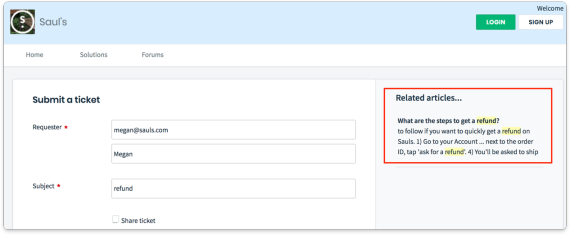
When a customer creates tickets from the portal, you can configure Freshdesk to auto-suggest solution articles based on the ticket subject he/she enters. Customers can click through to see if the article helps them resolve their issue or can submit the ticket if it doesn’t. By enabling customers to help themselves before contacting support, you can greatly reduce the incoming ticket volume and save time for your agents and customers.

Pricing starts from: $0

Free trial period: 21 days

Auto-suggest solutions Auto-suggest solutions

#2 Zoho CRM

Zoho CRM empowers businesses with a 360-degree customer lifecycle management solution. Its key features include:

Pricing starts from: $0

Free trial period: 15 days

#3 Clinked

Clinked is a cloud-based client portal and collaboration tool. It allows for efficient collaboration between teams, project groups, and business clients. Its key features include:

Pricing starts from: $83/month

Free trial period: 10 days

#4 One Hub

Onehub offers a suite of robust business tools with secure file storage and sharing service. Built for businesses of all sizes, its key functionalities include:

Pricing starts from: $15/month

Free trial period: 14 days

#5 SuperOkay

SuperOkay offers freelancers, agencies, and service providers, an easy-to-use dashboard to facilitate information exchange between you and your clients. Its key features include:

Pricing starts from: $25/month

Free trial period: 14 days

#6 Hub Intranet

The Hub is a collaborative intranet solution used by leading brands, helping them boost employee engagement, easily share news and resources, and communicate more effectively within one secure digital workplace. Its key features include:

Pricing starts from: custom pricing*

*Free trial available

#7 Huddle

Huddle is a document collaboration solution for enterprise and government, empowering their clients to collaborate effectively within a secure environment. Its key features include.

Pricing starts from: $30/month*

*Free trial available

FAQs about a customer portal software

Learn more about our software:

Articles you may find interesting